INDYCAR
4.22.28KReviews
Analysis ByAppCompare
I came away from INDYCAR feeling that it is aimed at fans who want the championship close at hand rather than people looking for a complete replacement for a live broadcast. As the official mobile application from INDYCAR, it has a clear job: keep the series within easy reach on a phone, whether I am checking in before a race, following the season between events, or trying to stay connected while away from a television.
That focus matters. Sports apps can become cluttered with unrelated stories, broad league coverage, and features that are impressive once but rarely useful. This one makes more sense when I treat it as a companion for INDYCAR interest. It is free, rated for Everyone, and available for Android devices running version 8.0 or later. That makes it approachable for families and for fans using older phones, although the experience will still depend on the device, connection, and how much activity is happening at the same time.
The application has been around since August 19, 2010, and its current version is 18.0.11. That long presence gives it a different feel from a short-lived promotional app: it is built around a series with an established mobile audience. Its average rating is 4.2 from around 9,400 ratings, while roughly 2,300 written reviews give prospective users a useful sense that it is actively used rather than merely installed and forgotten.
How it feels when speed matters
When I open a motorsport app, I do not judge speed only by how quickly the first screen appears. The more important question is whether I can reach the information I want without fighting the interface. INDYCAR works best when I use it with a simple intention: check the latest series information, orient myself around a race weekend, or catch up on developments I missed.
That is a more realistic expectation than treating it like a full timing workstation. A phone screen is useful for quick checks, but it is not automatically the best place for dense race information, prolonged viewing, or comparing several details at once. If I am already watching a race on television, the app is more valuable as a second screen than as the main event. I can keep it nearby for context while giving the broadcast my full attention.
For casual use, the free access is a strong advantage. I can recommend it to someone who follows INDYCAR occasionally without asking that person to commit to a subscription before discovering whether the app fits their habits. It is also a sensible starting point for a new fan who knows the series but has not yet settled on a regular way to follow it.
There is a useful distinction between perceived speed and actual network performance. A page may feel quick when I am checking a small amount of information, then feel less immediate during a busy race period when many fans are opening the app at once or when the connection is weak. I would not use the app as my only source for a moment where every second matters. For that, I prefer a stable broadcast or a dedicated live-data service designed specifically around timing.
What I do before opening it on race day
My most practical routine is to open the app before the event becomes busy. I check that the application starts normally, look through the available race-related information, and make sure I know where the material I care about is located. This small habit avoids wasting the first important minutes of a race searching through screens.
It also helps me separate two kinds of use. Before the race, I have time to read and explore. During the race, I want short visits and minimal navigation. Thinking about those as different workflows makes the app feel faster, even though the underlying connection has not changed.
A second useful habit is to use the application as a catch-up tool rather than constantly refreshing it. If I am working, commuting, or spending time with family, repeated checking can become distracting and may not add much. I get more value by checking at sensible breaks, then returning to the main activity in front of me.
Heavy-use moments and everyday scenarios
The most demanding situation is naturally a live race period. That is when I am most likely to open the app repeatedly, move between sections, and expect current material to be easy to find. It is also when a small delay feels more noticeable. A page that would seem perfectly acceptable on a quiet weekday can feel frustrating when I am trying to follow an unfolding contest.
In that setting, I would keep the phone on a reliable connection and avoid treating the app as the sole authority for urgent updates. If the application is being used alongside a television broadcast, radio commentary, or another trusted source, a temporary pause is less disruptive. If I am away from those alternatives, I would be more cautious about relying on it for continuous, moment-by-moment awareness.
One realistic scenario is a Sunday afternoon when I am visiting relatives and cannot sit in front of the television. I can use the app during a break to reconnect with the event, read what has developed, and decide whether I need to find a fuller viewing option later. That is where its portability matters. It turns a missed window into a manageable catch-up rather than leaving me completely disconnected from the series.
Another scenario is following the championship while travelling. A dedicated sports application is more convenient than searching the web repeatedly because I already know where to begin. The trade-off is that a mobile app still depends on the quality of the connection and the phone’s ability to keep it responsive. In an airport, crowded venue, or moving vehicle, I would expect a less consistent experience than at home on a strong network.
Heavy use can also expose practical annoyances that casual visits hide. Frequent loading, switching between screens, and keeping the display awake may make the phone feel warmer or use more battery than a short reading session. I cannot promise the same result on every device, so I would avoid beginning a long race-day session with a nearly empty battery. Keeping a charger or power bank nearby is a small but worthwhile precaution.
The best race-day strategy is to use INDYCAR as a focused companion, not as the only screen carrying the entire experience. That approach reduces the impact of a slow reload and lets the app do what a phone app does well: provide convenient access when I am not settled in front of a larger display.
Why short sessions suit it better
I find short, purposeful sessions easier to enjoy than leaving the app open indefinitely. A quick visit before an event, another during a break, and a final check afterwards match the way many people actually use a sports companion. This also reduces the pressure on the device and makes any temporary loading issue less disruptive.
For fans who want a constantly updating dashboard, the usual alternative may be better. A dedicated live-timing product, a television service, or a browser page designed for desktop viewing can offer a more continuous experience. I would choose the official application when convenience and series-specific access matter more than maximum information density.
Reliability, recovery, and day-to-day confidence
The strongest sign of reliability here is not that every session will be perfect; no mobile application can guarantee that across every phone and network. It is that the product has remained part of the INDYCAR experience for many years and continues to receive version updates. That gives me more confidence than an app that appears only briefly around a single event.
Still, reliability has several layers. The application may launch correctly while a particular page takes longer to load. A connection may work for text but struggle with richer content. A phone may have enough storage for the app yet become sluggish because many other applications are active. When something feels wrong, I first distinguish between an app problem and a device or network problem instead of immediately blaming one side.
My recovery routine is straightforward: close the application if it has stopped responding, reopen it, and try again on a stronger connection. If that does not help, I would restart the phone and check that the installed version is current. These are ordinary steps, but they matter more during a live event because frustration can grow quickly when I keep tapping the same screen.
I also prefer not to leave a sports app running in the background for hours without a reason. Returning to it when needed gives the application a clean chance to refresh and avoids confusing an old screen with current information. That is particularly important when I have moved between Wi-Fi and mobile data during the day.
The audience size suggests that the app has practical reach: it has passed half a million installs. I read that as reassurance that the official mobile offering is not an obscure side project, but I would not interpret popularity as a promise that it will behave identically on every Android phone. Older hardware can still show slower transitions, and a newer update can feel different depending on the device.
What can interrupt the experience
The main friction is dependence on live connectivity. If I am in a place with unreliable service, the application becomes less useful precisely when I may want it most. I would prepare for that by checking important information before leaving a dependable connection and by keeping an alternative way to follow the event.
Another limitation is attention. A sports app can encourage repeated checking, especially when I am already invested in a race. That is not a technical failure, but it affects how I use it. I get a healthier and more practical experience when I decide in advance whether I am reading a recap, checking the latest series material, or simply orienting myself before watching.
Because the app is free, I also judge it by convenience rather than expecting the depth of a specialist paid service. Someone who needs highly detailed analysis, extensive historical comparison, or a professional timing workflow may eventually want another tool beside it. The official app remains useful as the first place I look, but it does not need to be the only place I look.
Device constraints and choosing the right alternative
The minimum Android requirement of 8.0 is reasonably broad, so many users should be able to try it without buying a new phone. That does not eliminate hardware differences. A recent phone with a strong connection will generally feel more comfortable during repeated race-day use than an older model with limited memory and many background tasks.
If my phone is older, I would close unused applications before a major event, keep enough free storage for normal system operation, and avoid judging the app while several demanding tasks are running. Those steps are not unique to INDYCAR, but they are especially helpful when I want quick returns to a live sports screen.
Screen size changes the decision too. On a compact phone, reading dense information for a long time can be tiring. A tablet or computer may be better for extended sessions, while the phone remains ideal for checking in while standing in line, commuting, or moving around the house. I see the application as mobile-first in the practical sense: its value comes from being available where a larger screen is not.
Battery condition is another overlooked constraint. A healthy battery makes repeated checks easy, but an aging battery can turn a long race session into a charging problem. I would not blame the application for every drop in battery life, yet I would plan around it if my phone already struggles to last through a normal day.
There is also a personal preference question. Fans who want the official identity of the series and a direct, uncomplicated way to stay connected should find the application appealing. Fans who mainly want broad motorsport news, cross-series comparisons, or a highly specialized live-data display may prefer a general sports platform or dedicated timing service. Those alternatives can be better for breadth or technical depth, while INDYCAR is better when the series itself is the priority.
Who should install it
I would suggest it to regular INDYCAR followers, occasional viewers who want an easy way back into the season, and families looking for a free sports app suitable for an Everyone-rated audience. It is also useful for people who often miss the beginning of an event and need a convenient way to catch up before finding a longer viewing session.
I would be less enthusiastic for someone who does not follow INDYCAR specifically. The app’s value comes from its focused subject, so a general sports application may offer more variety to a person who jumps between leagues and competitions. Likewise, a serious data-focused fan should compare this official companion with a specialist service before deciding whether it can replace an existing workflow.
One practical tip is to install it well before the race you care about, not moments before the start. That gives me time to become familiar with the layout, confirm that the phone handles it comfortably, and decide whether I need another screen for viewing. It is a simple way to avoid making a live event the first test of any application.
My performance verdict
After using it as a sports companion, I see INDYCAR as a convenient official gateway rather than an all-purpose motorsport command centre. Its free price, broad Android compatibility, established history, and focused purpose make it easy to recommend to fans who want the series available on their phone without unnecessary commitment.
Its performance is most convincing during short and medium visits: checking in before a race, catching up during a break, or staying connected while away from home. It becomes a more conditional recommendation during heavy live use, where connection quality, device age, battery health, and the limits of a phone screen all become more important.
The application is not the right choice if I need guaranteed uninterrupted live coverage, a dense professional timing interface, or a broad multi-sport news hub. In those cases, a broadcast, desktop experience, or specialist service may serve me better. That is not a weakness so much as a reminder to match the tool to the job.
For the intended job, I think it succeeds. INDYCAR gives fans a practical way to keep the championship within reach, and its long-running presence makes it feel like a dependable part of following the series. I would install it for quick access and race-weekend context, keep an alternative available for critical live moments, and recommend it most strongly to anyone who wants official INDYCAR coverage in a simple free mobile format.
FAQ
What is the INDYCAR app used for?
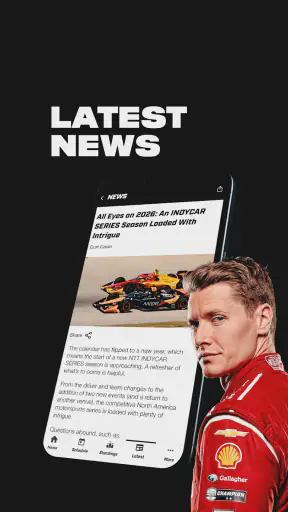
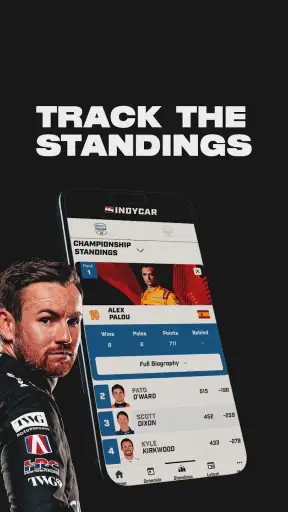
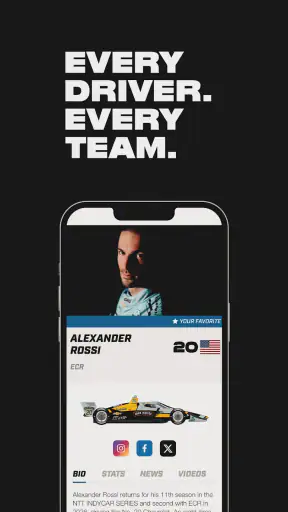
The INDYCAR app is the official mobile companion for fans of the NTT INDYCAR SERIES. It provides race schedules, results, standings, news, driver and team information, videos, and other championship updates. After testing the app, its main strength is bringing essential series information into one place, making it useful before, during, and after race weekends.
Can I watch live INDYCAR races in the app?
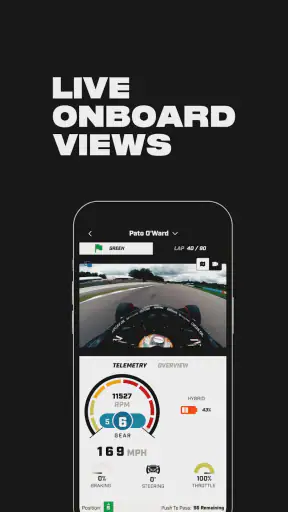
The app may provide live timing, race updates, highlights, news, and selected video content, but full live race streaming can depend on your country, broadcasting rights, and the current season’s agreements. Users should not assume every event is streamed directly in the application. Check the available video and live features in your region before downloading.
Does the INDYCAR app include live timing and race results?
Yes, live race information is one of the app’s most useful features. Depending on the event and connection, fans can follow timing updates, positions, lap information, results, qualifying details, and championship standings. The information is particularly helpful when you cannot watch the broadcast, although timing updates may occasionally be delayed by network conditions or official data availability.
Is the INDYCAR app free to download and use?
The official INDYCAR app is generally free to download, and many of its core features, including news, schedules, results, standings, and driver information, can be accessed without a subscription. However, mobile data charges may apply when using video or live features. Some content can also vary by location, device, season, or broadcasting restrictions.
Does the INDYCAR app work on both Android and iPhone?
The INDYCAR app is designed for mobile users and is commonly available for both Android and iOS devices through their official app stores. Compatibility can depend on your phone model, operating system version, and the developer’s current support requirements. Before installing, review the store listing, permissions, download size, and recent user feedback to confirm that your device is supported.
Pros
- Official schedules
- results
- standings
- and race updates in one place.
- Live timing helps fans follow laps
- positions
- and on-track progress.
- Includes news
- videos
- driver profiles
- and team information.
- Useful companion for following the full INDYCAR season.
- Clean design makes key racing information easy to find.
Cons
- Some live features may require a subscription or vary by region.
- Notifications can become frequent during race weekends.
- Video availability may differ depending on location and rights.
- Live timing can use significant battery and mobile data.
- The app is mainly focused on INDYCAR and offers limited other racing content.